
How an AI Agent Turns Creative Files Into Campaign Decisions
The file is only the starting point. An agent also needs to know what the creative is, where it can run, and what happened when it did.
Most performance teams have plenty of creative files. The shortage is context.
A team may have new videos in Google Drive, image ads already running on Meta, older versions buried in campaign history, and another batch arriving from an agency. Finding a file is usually possible. Deciding whether it is the right file for the next campaign takes more work.
Which product does it support? Which landing page should receive the traffic? Is the format ready for Meta or Demand Gen? Has the idea already been tested? Did it perform well, or is the team about to repeat an old experiment without realizing it?
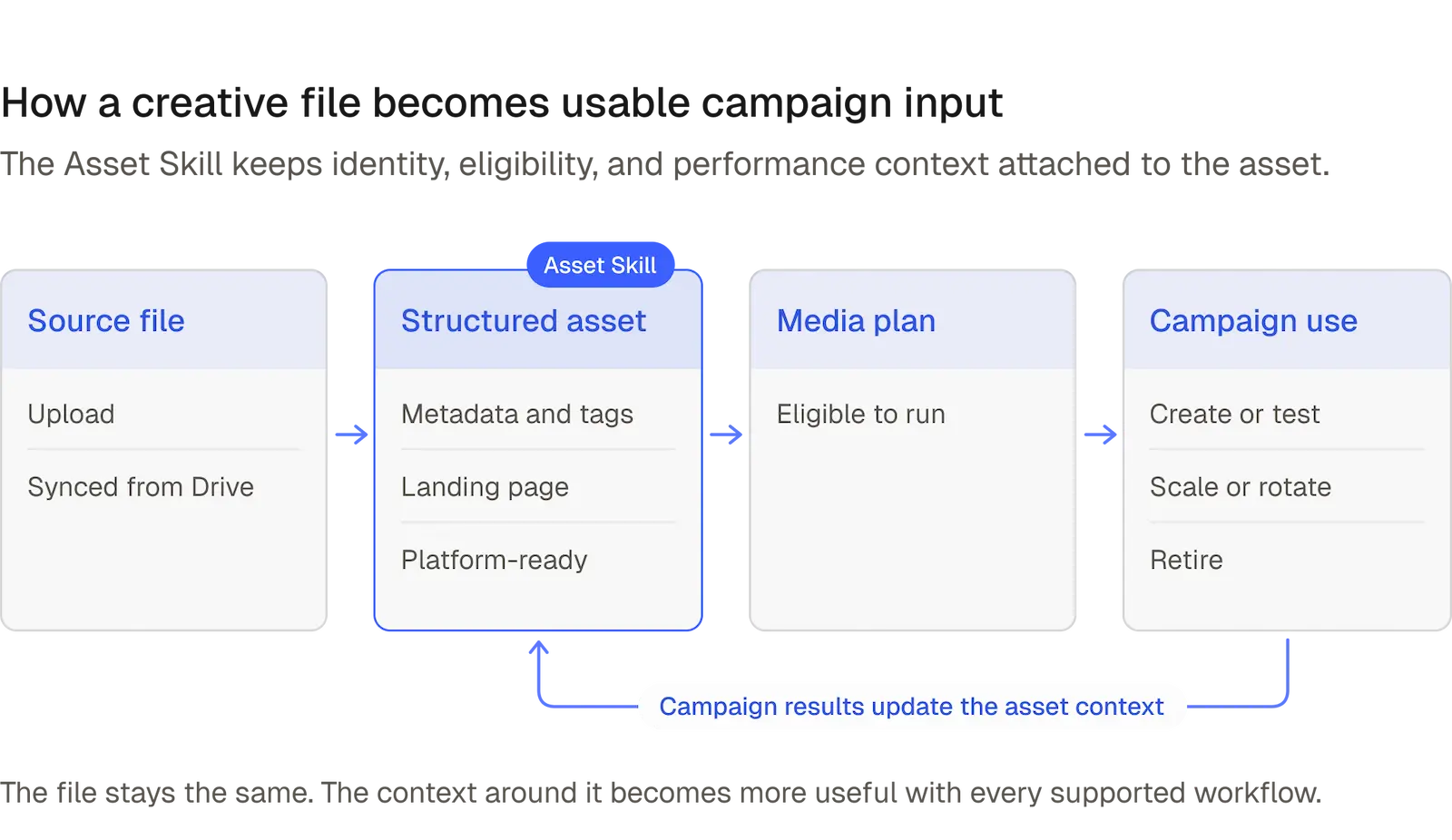
MAI’s Asset Skill gives creative a usable operating context. It connects assets with metadata, tags, landing pages, platform eligibility, Media Plans, and campaign-performance history. That structure helps MAI’s platform agents use the right creative in supported campaign workflows.
A file needs context before an agent can use it
A video file does not explain itself. Its filename may describe the concept, or it may be the sixth export of a project with “final” in the name. Either way, a media buyer still has to work out where it belongs.
The Asset Skill attaches information the campaign workflow needs: the client and product, useful labels and tags, the intended landing page, whether the file meets platform requirements, and which Media Plans are allowed to use it. MAI can also maintain creative-operation details such as image resizing where supported.
This changes the handoff from creative production to media buying. The team is no longer passing a folder to someone who must reconstruct the intent behind every file. An asset can arrive with enough structure to become a candidate for the next supported workflow.
Eligibility comes before performance
Strong creative can still be unusable for a specific campaign. It may point to the wrong landing page, belong to another product, use an unsupported format, or sit outside the Media Plan’s approved asset set. None of those problems can be fixed by a good click-through rate.
The Asset Skill helps narrow the library to the files that are actually ready for the job. For a given workflow, MAI can use asset metadata, tags, landing-page relationships, and platform readiness to determine which assets are eligible. The Media Plan supplies the final campaign boundary.
Imagine a library with 80 assets. Only 12 may belong to the current product, use an approved landing page, and be available to the intended platform. Those 12 should enter the candidate pool. The other 68 can remain organized without becoming accidental campaign inputs.
This operational layer is distinct from the creative judgment discussed in When Everyone Has the Same Algorithms, Creative Matters More. People still decide what to make and what the brand should say. The Asset Skill makes the resulting work usable by the media system.
The context an asset needs
| Context layer | Question it answers | What it enables |
|---|---|---|
| Identity | What is this asset? | Searchable metadata, labels, and tags |
| Destination | Where should it send traffic? | An approved landing-page relationship |
| Eligibility | Where is it allowed to run? | A usable candidate for a Media Plan and platform |
| History | What happened when it ran? | Better-informed testing, reuse, rotation, or retirement |
The Media Plan determines what is in play
The Asset Library can contain far more creative than any campaign should use. The Media Plan narrows the field. It defines the platform and campaign type, along with relevant scope such as assets, products, landing pages, audiences, locations, budget, and performance target.
For Demand Gen, the plan can use all eligible assets, a fixed asset list, or tags that include newly available creative. Meta Media Plans can also define eligible Asset Library content directly or through tags. Once a new asset has the required context and platform availability, it can become a candidate without rebuilding the entire plan.
Customer story See how Flamingo expanded from Shopping into Demand Gen and Meta.
That is the practical distinction between storage and control. The library records what exists. The Media Plan records what a specific workflow may use. The relationship keeps campaign creation and tuning connected to the scope the team approved.
Performance history should return to the asset
Once creative starts running, the account learns something new. The asset now has campaign history: where it appeared, whether it is still testing, how its performance has changed, and whether the evidence supports continued use.
MAI can keep campaign-performance history with the asset and use lifecycle states such as testing, winning, declining, and retired. A marketer reviewing the asset later can start with that context instead of opening several campaigns and reconstructing the story from separate date ranges.
Past performance does not make an asset a universal winner. Results can change by platform, audience, campaign, landing page, and time period. The useful point is simpler: the next decision should not begin by forgetting everything the account has already learned.
Predicted performance and competitor creative intelligence can add further context to discovery and prioritization. They should guide what deserves attention rather than substitute for live campaign evidence. The asset still has to earn its treatment in the account where it runs.
The library and the campaigns form a feedback loop
The Asset Skill becomes more valuable when information moves in both directions. Creative enters with identity, destination, and eligibility. A Media Plan makes it available to a supported workflow. The platform agent can create or test it, and the resulting evidence returns to the asset record.
Suppose a team adds six videos for a product launch and tags them to the same product. A Meta or Demand Gen Media Plan makes those assets eligible. As they run, MAI can track which remain in testing, which build stronger evidence, and which begin to decline.
Those learnings do not need to remain trapped in the campaign where they appeared. They can inform later use and, where relevant, opportunities to test a creative idea on another connected channel. This supports the broader principle that useful evidence should travel across the media mix.
Automation begins with a clean asset structure
The team still has to define the organizing logic. Which tags matter? Which products and landing pages belong together? Which assets should be eligible for a particular Media Plan? The answers reflect brand and business judgment that software should not invent.
A useful setup does not require an elaborate taxonomy. A team running Meta and Demand Gen across three product lines might begin with product tags, approved landing-page mappings, and one eligibility rule for each Media Plan. That is enough to give incoming creative a consistent route into the account.
Google Drive syncing can reduce the manual handoff when that is the team’s source workflow. New files can flow into the Asset Library, pick up the relevant labels and metadata, and become available for supported processing and campaign use. The team remains responsible for the source content and the eligibility rules.
Start with the creative you expect to use next
A large archive can make asset organization feel like a migration project. It does not need to begin that way. Start with the creative already running and the next batch the team expects to test.
Confirm the product tags, landing pages, platform readiness, and Media Plan eligibility for that set. Then check whether the performance history remains attached as assets move through testing, scaling, rotation, and retirement. Add more of the archive only when it has a reason to re-enter the workflow.
The result is a creative library with an operating purpose. It helps the agent understand what is usable now, what has already been learned, and which assets deserve consideration next.
See how MAI's Asset Skill connects creative to campaign work
Connect one active creative set to the Asset Library, define its landing pages and eligibility, and put it to work inside a Meta or Demand Gen Media Plan.
Similar articles
How MAI's Meta Agent Decides Which Ads Get More Budget
- Meta Ads
- AI Agents
- AI Media Buying
- Creative Optimization
- Campaign Optimization
See how MAI's Meta Agent protects creative tests, scales sustained winners, and reduces declining ads within a controlled Meta Media Plan.
How a Google Demand Gen Agent Gives New Creative a Fair Test
- Google Ads
- AI Agents
- AI Media Buying
- Creative Optimization
- Campaign Optimization
See how a Google Demand Gen agent moves eligible creative through controlled testing, scaling, and rotation inside a Media Plan.