
The 7 Questions Every Weekly Paid Media Report Should Answer
A practical review sequence for moving from account results to the few decisions that deserve attention this week.
A weekly paid media report can contain every important metric and still leave the meeting with one unanswered question: what are we doing next?
That usually happens when the report is organized around platforms and charts instead of decisions. Google gets a page. Meta gets a page. Spend, clicks, conversions, CPA, and ROAS all appear. Then the reader has to reconstruct the story: what moved, where it moved, whether it matters, and who should respond.
The fix is not another dashboard. It is a fixed set of questions that turns account data into an operating review. The seven below are deliberately sequential. Each one produces an output the next question can use.
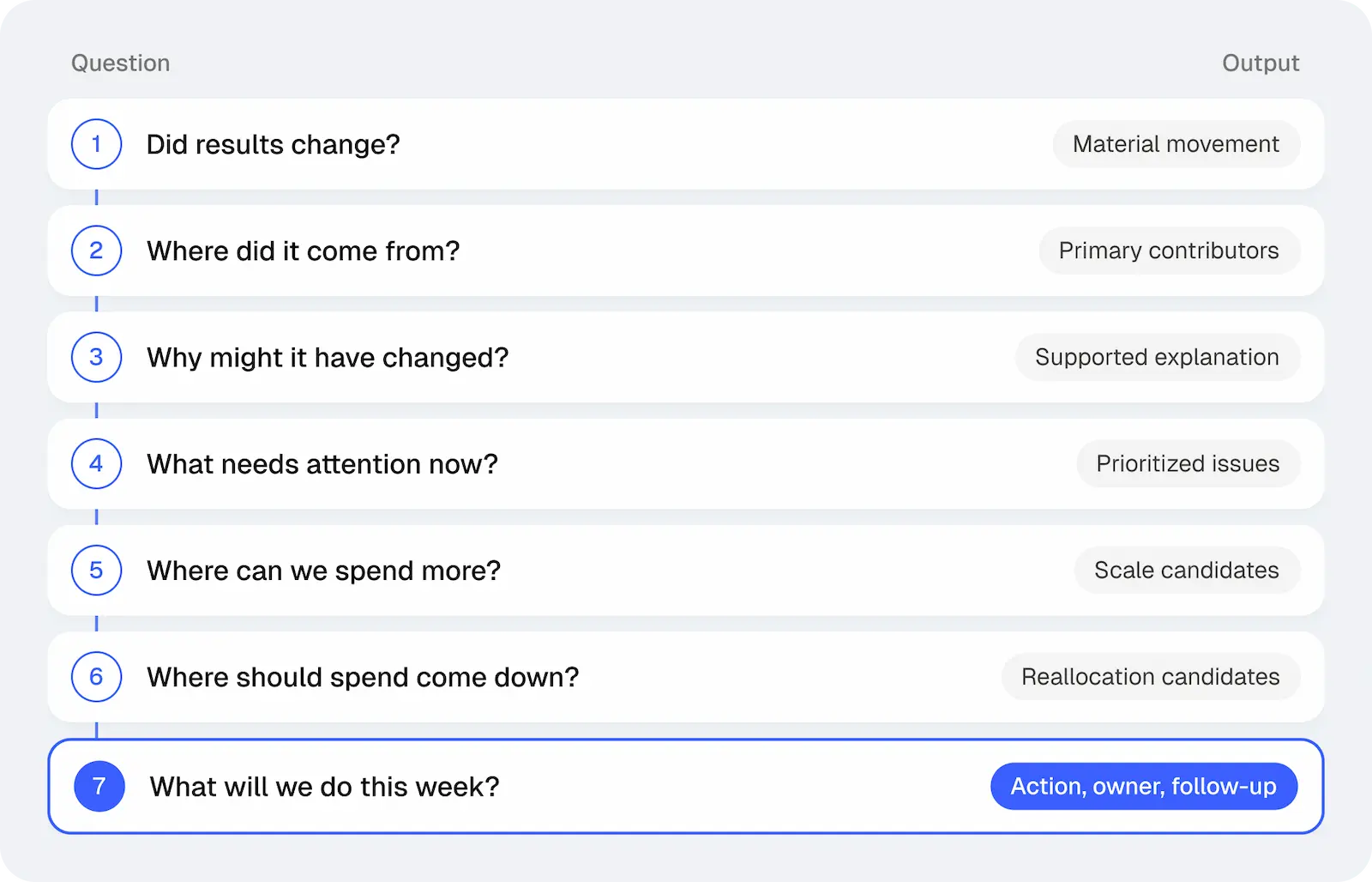
1. Did performance actually change?
Start with the business result, not the channel tour. Show spend, conversion volume, CPA or ROAS, and the outcome the account is meant to improve. Then choose a comparison that can support a decision.
Week over week is convenient, but it is not automatically useful. A promotion may have ended, the prior week may contain a launch, or weekday effects may distort a short window. In those cases, a four-week average, the same weekdays, or a comparable promotional period can provide the better baseline.
The report should also say whether the movement is material. CPA moving from $51 to $52 on steady volume may be normal noise. Moving from $51 to $67 while spend holds flat deserves attention.
Output: one sentence stating the result, the comparison, and whether the change is large enough to investigate.
2. Where did the change come from?
Account totals reveal the symptom, not the source. Break the movement down only as far as needed to find the contributors: platform, campaign, product group, geography, device, audience, creative, query, or landing page.
If total CPA rose 15%, the useful finding may be that Search was stable while one Meta campaign took more spend at a weaker conversion rate. Stable account ROAS can also hide a Shopping gain that offset a decline elsewhere. Those situations call for different decisions.
Do not paste every campaign into the report. Rank the few segments that explain most of the movement and leave stable areas in the background.
Output: a short contributor list that reconciles back to the account-level change.
3. What does the evidence say about why?
Now move beneath the result. If CPA increased, did CPC rise, did conversion rate fall, or did both move? If ROAS declined, was the pressure coming from acquisition cost, average order value, product mix, or measurement timing?
Then inspect the timeline. Did a budget change, new creative, query shift, landing-page release, promotion, inventory event, or tracking edit occur at roughly the same time? The goal is not to manufacture a neat story. It is to identify the explanations the evidence can support and mark what remains uncertain.
“Conversion rate fell after the landing-page release” is an observation. “The release caused the decline” requires stronger evidence. That distinction keeps a plausible theory from turning into an overconfident account change.
Output: the leading explanation, its supporting evidence, and any important uncertainty.
4. What needs attention now?
A report becomes useful when it separates urgent problems from watch items and ordinary variation. A broken destination, missing purchase signal, or search term consuming material budget with no return may require action today. A modest change on thin volume may need another review point, not an optimization.
Give every material finding one status: act, investigate, watch, or normal. This makes priority visible to a growth lead who should not have to read ten campaign tables to discover the one issue that needs an owner before noon.
Output: a prioritized issue list with severity, confidence, and the next review trigger.
5. Where is there room to spend more?
Reporting should look for opportunity as carefully as it looks for damage. Surface campaigns that are within target and may still have room to absorb budget. Then ask what happened at the margin the last time spend increased.
The highest historical ROAS is not always the best place for the next dollar. A small campaign may be efficient but close to saturation. Another may have slightly lower average efficiency and far more incremental demand. Inventory, margin, promotions, and strategic priorities can change the answer again.
Output: one or two scale candidates, the constraint being relaxed, and the evidence that efficiency may hold.
6. Where should spend come down?
Use the same discipline on the other side of the allocation decision. Look for campaigns with sustained performance outside target, queries consuming budget without sufficient outcomes, products with weak economics, or spend that no longer matches the business priority.
Time horizon and sample size matter. One bad day is rarely enough. Also check whether the apparently weak spend contributes value that last-click reporting misses. The goal is not to create a weekly pause list; it is to identify money that has a credible better use.
Output: the proposed reduction or reallocation, plus the window and evidence used to justify it.
7. What are we doing this week?
End with a small action register, not another summary. For each issue or opportunity, state the decision, owner, timing, approval requirement, and the signal that will determine whether the action worked.
“Review Meta” is not an action. “Move 10% of prospecting budget from Campaign B to Campaign A after approval; check marginal CPA after three days” is. So is “make no change until the campaign reaches 30 conversions, then review again.” Waiting can be a good decision when the trigger is explicit.
Output: a short list of owned actions and follow-ups that can be reviewed in the next report.
A one-page template for the review
| Report block | Question to answer | What belongs there |
|---|---|---|
| Outcome | Did results materially change? | Business KPI, spend, agreed comparison, materiality |
| Drivers | Where did the movement come from? | The few campaigns, products, queries, creative, or pages explaining it |
| Explanation | What does the evidence support? | Likely cause, relevant timeline, and uncertainty |
| Priority | What needs attention now? | Act, investigate, watch, or normal |
| Allocation | Where can spend rise or fall? | Scale and reallocation candidates with constraints |
| Action register | What happens this week? | Decision, owner, timing, approval, and follow-up signal |
If a chart or paragraph cannot support one of these blocks, it probably does not belong in the main weekly report. Keep supporting detail available for investigation rather than forcing every reader through it.
How MAI supports the workflow
The live guide on decision-ready weekly reporting explains the broader reporting architecture. This seven-question version is the practical review script to use inside that architecture.
MAI’s Reporting skill can use connected marketing data, report templates, account history, and user-provided instructions to prepare recurring or on-demand reports for different audiences. It can surface material movement, investigate likely contributors, and connect findings to recommended next steps. Some workflows still expect the marketer to review and refine the report before sharing it.
Customer story See how Velotric found new segments to scale and improved ROAS 118%.
That review matters. MAI may have the account history; the marketer may know that inventory is constrained, finance changed the target, a promotion was extended, or a launch deserves patience. The useful handoff puts those inputs next to the media evidence instead of treating them as separate conversations.
Weekly reporting also works best when it connects to ongoing account monitoring and investigation. An alert identifies movement; the report shows what the team learned, decided, and will check next.
Judge the report by the meeting it creates
A good weekly report changes the discussion from “What happened?” to “Do we agree with these decisions?” The numbers still matter, but they arrive already organized around the work.
If the team can see the material result, trace it to the right part of the account, understand what the evidence supports, and leave with a short action register, the report has done its job. If everyone still opens the ad platforms to figure out what the report means, it has only moved the data—not the decision.
Frequently asked questions
How long should a weekly paid media report be?
Long enough to explain material movement and decisions, but short enough that the action list stays visible. Keep stable areas brief and move diagnostic detail to supporting views.
Should every platform get its own section?
Only when that structure helps the reader make a decision. Organizing around business outcomes and material contributors is usually more useful than giving every platform equal space.
Should the report recommend changes every week?
No. A recommendation to wait can be correct when volume is thin or evidence is incomplete, as long as the next review trigger is explicit.
Can AI generate the whole report automatically?
AI can reduce construction and analysis work, but business context, consequential decisions, and the final review may still require a marketer. The appropriate workflow depends on the configured process and permissions.
Turn your weekly report into a decision workflow
Bring the report your team currently builds by hand. See how MAI can use connected data, recurring instructions, and your review process to prepare a clearer weekly handoff.
Similar articles
Your Monday Report Shouldn’t Take Until Wednesday
- Marketing Reporting
- AI Media Buying
- Performance Marketing
- Marketing Automation
- Client Reporting
Build a weekly marketing report that explains material performance changes, preserves context, and turns evidence into clear next actions.
Something Changed in Your Ad Account. Now What?
- Ad Account Monitoring
- AI Media Buying
- Performance Marketing
- Anomaly Detection
- Paid Media Optimization
Ad performance changed. Learn how to validate the signal, investigate what happened, choose an evidence-matched response, and keep monitoring.